DataCosmos Release Notes - November 20, 2026
New Features
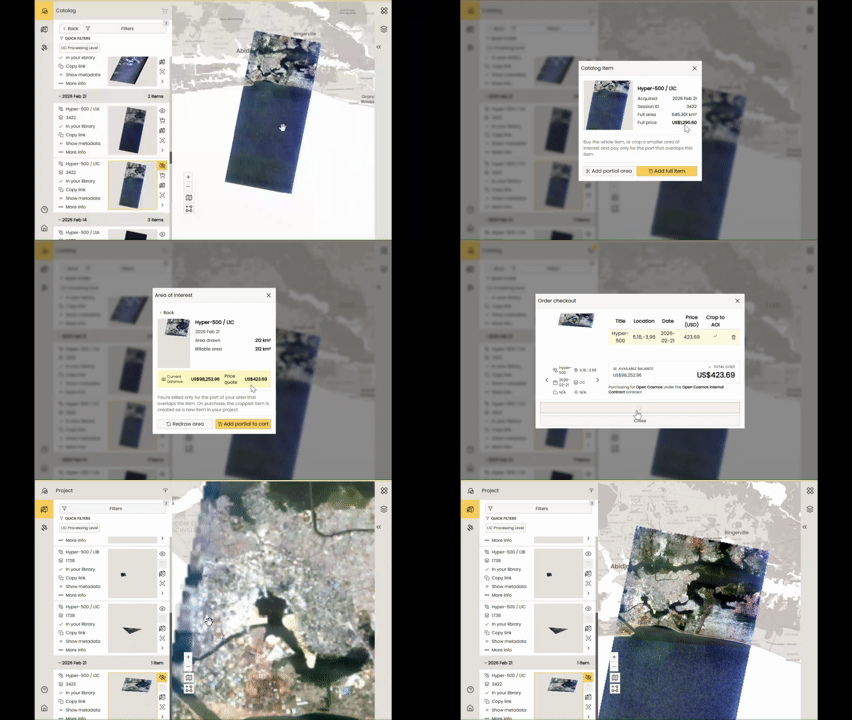
Partial Scene Image Purchase and Delivery
You can now purchase, download, and work with cropped portions of image scenes directly through the platform, paying only for the specific area you need. Cropped images display correctly in projects and on the map, and downloads reliably deliver the exact region you selected. Your assets and project data are also better protected, ensuring files remain intact and accessible throughout the process.
Features Include:
-
Tailored Area Selection: Easily draw and define custom polygons directly over original image scenes to pinpoint the exact area you need.
-
Instant Dynamic Pricing: Get accurate price quotes calculated in real-time based strictly on your selected polygon's spatial area.
-
Intelligent Metadata Inheritance: Your cropped scenes retain essential metadata from the parent image while generating accurate new spatial coordinates (bbox, geometry, etc).
-
Seamless Purchase & High-Res Download: Enjoy a familiar, streamlined checkout experience. Once purchased, your processed partial imagery is delivered straight to your Project space, ready for full-resolution download!
Organisation Orders
Organisation members can now view all orders placed within their organisation, giving teams better visibility into purchasing activity without requiring administrator assistance
Improved Product Thumbnails
Product thumbnails have been updated to give a clearer, more accurate preview of what you're selecting — including partial or clipped image areas. This makes it easier to confirm exactly what you'll receive before downloading, saving time and reducing guesswork
Improvements
Tasking Request Delivery and Display Improvements
Creating and managing tasking requests is now more flexible and reliable. Improvements include:
- Upload multiple Areas of Interest at once
- Set a minimum update frequency to control how often imagery is collected
- Allow the system to automatically prioritise time-sensitive requests based on your service level needs.
Imagery is also now consistently delivered to the correct project, giving you greater confidence in your tasking workflows Tasking requests now display product names, statuses, and advanced configuration options consistently and accurately across the platform. Tooltips on the 'Created From' and 'Created By' fields also help you quickly understand the origin and ownership of each request. These improvements make it easier to track, configure, and manage your tasking orders without confusion or the need to contact support.
Improved Request & Order Status Accuracy
Order and request statuses now more reliably reflect what's actually happening with your activity, from when imagery is delivered to how credits are charged and when access is revoked after a refund. The information shown for each order has been cleaned up so only relevant details appear, and statuses are clearer and easier to understand at a glance. These changes reduce the need to contact support to clarify where things stand or resolve billing questions.
Organisation Resources Tab Improvements
The Organisation Resources section has been redesigned for a cleaner, more intuitive layout, making it faster and easier to find and manage your organisation's resources. Administrators can now manage configuration settings and satellite groups separately for each organisation, giving more precise control over resources and permissions. Additionally, a fix ensures that users added by invitation now receive the correct roles and permissions as expected.
Improved Catalog Validation Errors
Catalog validation now surfaces all errors at once, with clearer and more actionable messages, so you can review and fix every issue in a single pass. The workflow selection list also loads with richer, more accurate information, making it easier to find and choose the right workflow for your task.
Project Filters
Project filters now include all available filter options, giving you complete control when searching and narrowing down your projects. No valid filter criteria will be missing from the selection.
Colour Scheme Consistency
The colour scheme has been updated to reflect the latest visual standards. This improves consistency and accessibility across the interface. D
Bug Fixes / System Robustness
GeoPDF Export Stability
You can now export your maps and data in GeoPDF format without interruption. Previously, GeoPDF exports would crash before completing; this has been resolved so you can reliably generate GeoPDF files whenever you need them.
Contract ID and Details Display
You can now see contract IDs, processing levels, and other key details directly in the contracts section, making it easier to identify and understand your agreements at a glance. Contract information is also kept separate between organizations, so you will always see accurate details relevant to the organization you are currently working in.
Image Price Units
The unit label next to image credit counts has been updated to display more clearly, so it can no longer be mistaken for the number 1. This makes it easier to read your available credits at a glance.
Download Partial Purchases from Layers menu
You can now download assets from Layers for items that were partially purchased. Previously, these downloads would fail, leaving some purchased content inaccessible.
Bulk File Download
Bulk file downloads no longer cause processing delays or backlogs in order notifications. Orders with large numbers of files now complete reliably without slowing down related activity for other users.
View Asset Icon
The View Asset icon no longer appears active when there is no asset available to display. This prevents confusion about whether content is accessible when it is not.
Questions or Feedback?
If you have any questions about this release, please contact us at the DataCosmos Helpdesk.