Data search and filter
The DataCosmos catalogue maintains a global archive of satellite imagery across many earth observation platforms.
To allow the users to find the relevant images in a timely manner, the catalogue can be filtered by multiple search criteria.
Open filters window
To search the catalogue, select the filters tool.
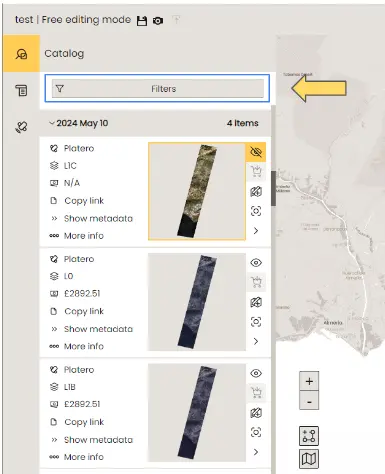
Filter menu
The filters menu offers a wide selection of search parameters. As you adjust these filters, the list of available products in the catalog window will update continuously. All search filters are optional, meaning that if no filters are selected, the entire catalog will be displayed.
Most images can be identified using three primary search criteria: location, observation period, and satellite platform. For more advanced searches, additional data parameters can be specified. These are described in detail here.
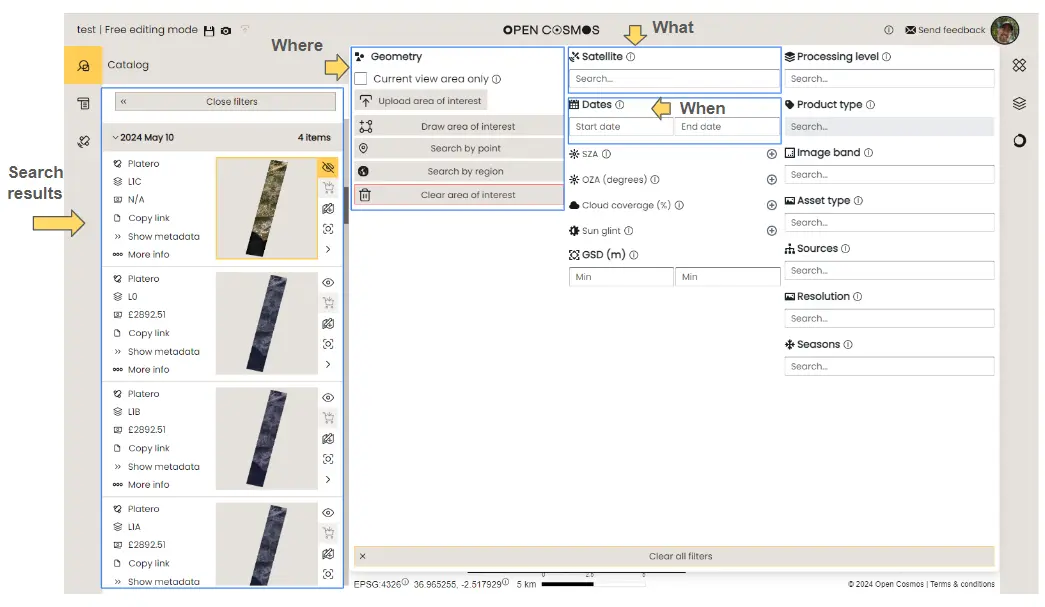
Search by location
There are several ways of searching the catalogue by geographic location. These are described below:
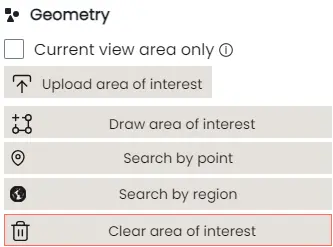
Current view area only
You can navigate the Data Viewer by scrolling around the base map in the main window or by selecting a location on the inset mini-map. Once you are satisfied that the viewing window covers your area of interest, you can check the "Current View Area Only" box to display only the observations made in this area within the catalogue.
How to filter the DataCosmos catalogue by the visible area in the current view.
Upload area of interest
Areas of interest, defined by a polygon or shape footprint on the earth, can be stored as .geojson, .gpkg, .shp, .kml, or .kmz files and uploaded to the platform.
These shapes are created using a sequence of geographical coordinates and can form any shape necessary to define the user's region of study.
How to upload an Area of Interest (AOI) to filter the DataCosmos catalogue.
Draw area of interest
By selecting "Draw Area of Interest," users can define their region of interest in the data view window by clicking on locations to outline the boundary of the AOI.
How to draw an Area of Interest (AOI) to filter the DataCosmos catalogue.
Note - Users must complete the search area by re-selecting the initial coordinate, otherwise the search area will not be stored.
Search by point
By clicking search by point, users are able to filter the catalogue by only images that intersect a given coordinate.
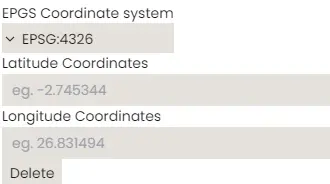
Note - By default, coordinates are identified in decimal degrees (Lon / Lat), however users can select an alternative coordinate system from the drop down menu if required.
Search by region
By selecting "Search by Region", users can type in a geographic location and select the correct location from the suggested list of options.
This will automatically display a pre-defined region of interest, typically describing the administrative boundary of the chosen region.
How to search the catalogue by region.
Search by date
Users can filter the catalogue by specific observation period.
In DataCosmos, you can search from the current date back by a predefined period (e.g., 1 week, 1 month, 6 months, etc.) or you can specify a period of time using a start and end date.
How to search the catalogue by a pre-defined period of time before the current date.
How to search the catalogue by a given date range.
Search by product
DataCosmos contains data products from a range of Open Constellation and 3rd party satellites. Users can filter their search results by these differnt platform by selecting them from the Satellite field.
This video demonstrates the steps to search the catalogue by data product.
Advanced Search
The filters tool provides more advanced search capabilities with several specialsit parameters. These include:
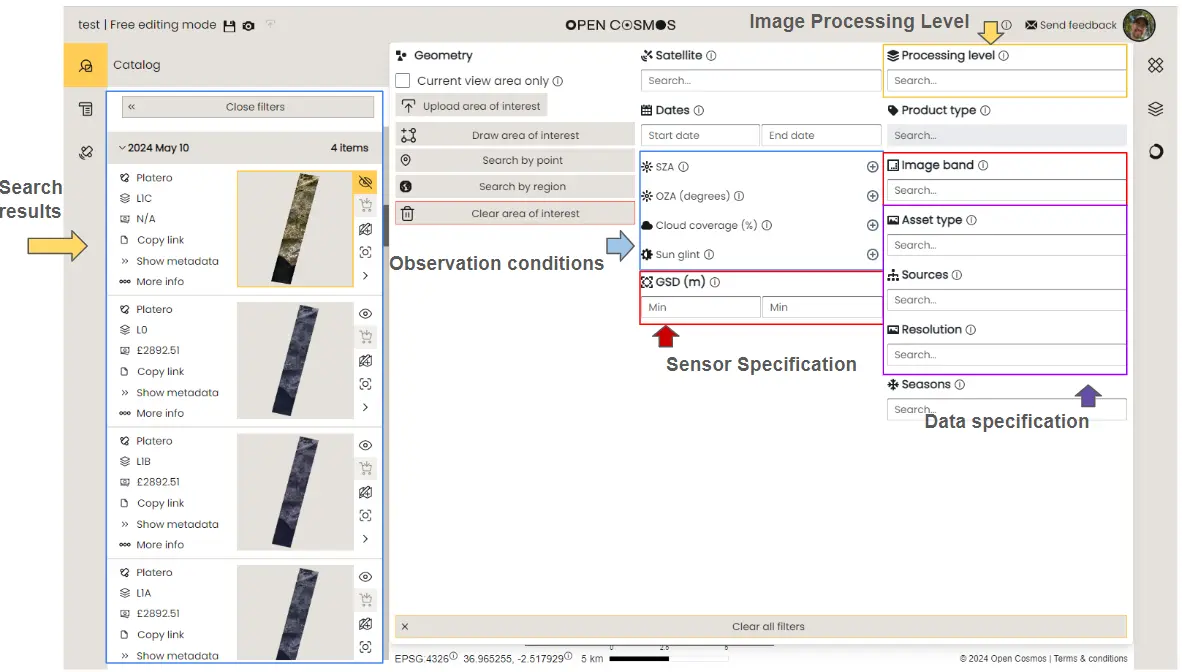
Image processing level
Users can filter their search by the amount of image processing that has been applied to a given product/image.
These levels include:
Level 0 (L0)
- Raw image converted from binary - limited image processing
Level 1A (L1A)
- Relative correction - removal of known artifacts in the images generated by the sensor configuration
Level 1B (L1B)
- Radiometric correction - conversion of digital number pixel values to top of atmosphere (TOA) reflectance values
- Geometric correction - correct the geographical positioning of the image relative to a validated ground reference image (GRI).
- Band alignment - correct for any misaligning of pixel positions between bands.
Level 1C (L1C)
- Orthorectification - correct geometric errors due to variations in ground surface topography/altitude.
Sensor Specification
Each satellite image in DataCosmos is captured with specific sensor specifications. These specifications may determine the image's suitability for various applications and can be filtered in the user's search.
Image (Spectral) Band
- The satellites available in DataCosmos provide an array of specific spectral bands. Some user applications may require one or more of these spectral bands. Users can filter their results to include only the satellites that carry the spectral bands they need.
Ground Sample Distance
- Ground Sample Distance (GSD) describes the measured distance between two pixels on the ground, also known as the spatial resolution.
- GSD can be critical when selecting satellite data - smaller GSDs offer higher resolution for detailed analysis (e.g., asset scale applications, like urban planning or precision agriculture), while larger GSDs are better for broader landscape overviews.
Observation conditions
Satellite observations are performed during various geometric and atmospheric conditions. These factors may be critical to the intended application and can therfore be filtered out by the users requirements.
Solar Zenith Angle
- The angle between the vertical direction at a given location and the line of sight to the sun.
Observational Zenith Angle
- The angle between the vertical direction at a given location and the line of sight to the satellite.
Cloud Coverage (%)
- The percentage of the image occupied by meterological clouds.
Sun Glint (%)
- The percentage of the image affected by sun glint, which is the high reflectance value over water surfaces caused by the direct reflection of sunlight to the satellite.
Data Specification
DataCosmos offers a variety of data types derived from real-world observations and statistical analyses, available in multiple image resolutions. Users can filter these data specifications to suit their needs.
Asset Type DataCosmos provides both raster (imagery) and vector (feature) datasets. These can defined as:
- Vector Data- Geographic features using geometric shapes such as points, lines, and polygons. Each feature is associated with attributes that describe it. For example:
- Points: Represent discrete locations, like a city or a landmark.
- Lines: Represent linear features, such as roads or rivers.
- Polygons: Represent areas, like lakes, forests, or administrative boundaries.
- Raster Data - Continuous data, described by a matrix of cells or pixels, where each cell has a value representing information, such as reflectance (imagery), or temperature, elevation, or land cover (feature datasets).
Sources
- Data can be provided from either satellite observations, or generated from mathemtical algorithms.
Resolutions
- Data can be viewed or purchased in either high or low resolution, which affects the rendering quality of the output image rather than the original resolution at which the image was captured.