Applications Hub
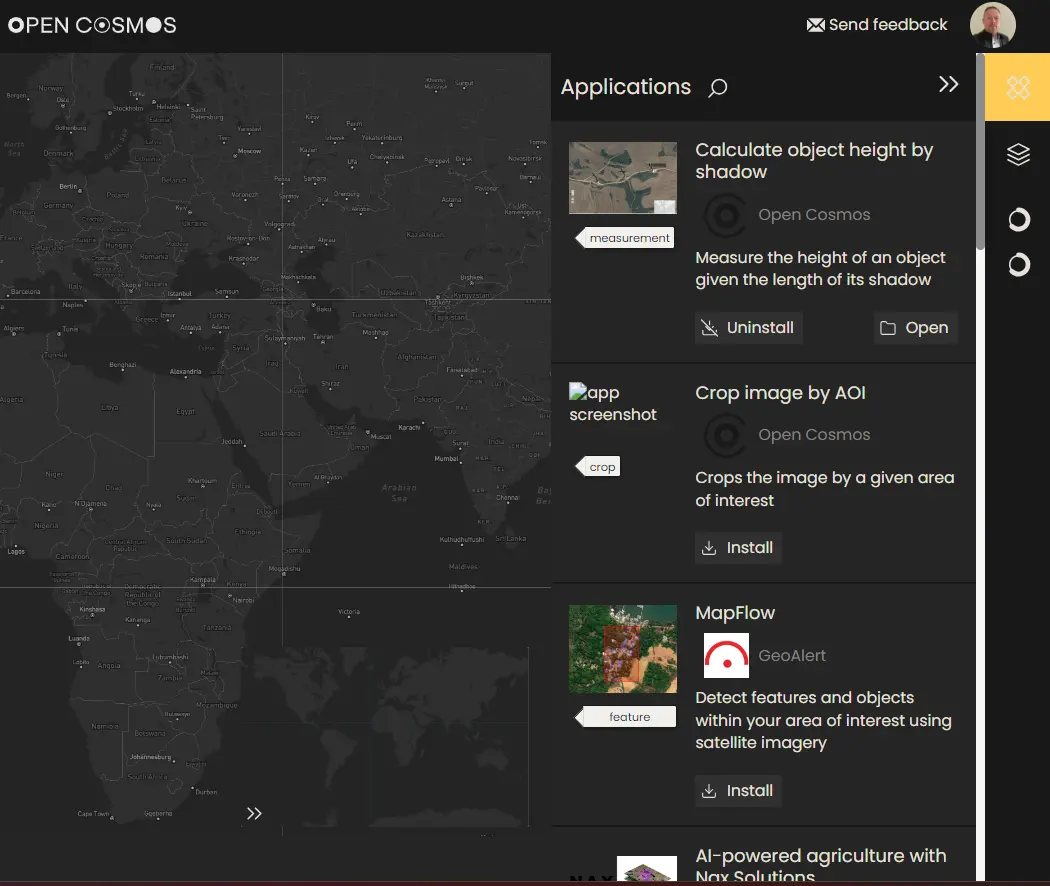
With the DataCosmos Applications Hub, users can access a selection of Open Cosmos and Third Party geospatial applications to perform complex data analytics within the DatCosmos UI.
Appplications can be installed via the Applications menu, for later use.
Installing geospatial applications from the Applications Menu.
Existing Applications
Currently, the Applications hub contains many bespoke applications for a range of geospatial tasks. These applications can be installed and used when the appropriate data is selected in the data viewer.
Water Turbidity
The generated maps of turbidity reveal the health and composition of targeted water bodies at a snapshot in time, as well as weeks, months and years; thus support the evaluation of environmental problems and potential health risks through the analysis of changes in water quality and the detection of harmful algal blooms.
This application has near-real-time capabilities to support emergency response and mitigation efforts. Results from this application can be provided in under 30 minutes from the application execution.
This application is provided by our partner Quasar; visit here to discover more.
Oil-spill detection
Integrated solution for oil spill detection, using advanced analysis of satellite optical and radar imagery to:
- Characterise and forecast oil spill events
- Visualise oil spill extent
This application has near-real-time capabilities to support emergency response and mitigation efforts. Results from this application can be provided in under 30 minutes from the application execution.
This application is provided by our partner Orbital EOS; visit here to discover more.
Height Measurement
Measure the height of an object on the ground using only its shadow and the known sun zenith angle associated with the image (found in the metadata).
This application was developed by our Data Engineers at Open Cosmos.
Wildfire monitoring
Applying spectral indices to:
- Categorisation of burn severity levels
- Delineation of the wildfire extent to support the decision-making process
- Analysis of the vegetation cover evolution to asses and evaluate restoration plans
- Wildfire prevention, analysis of wildfire risk, exposure and vulnerability to avoid future wildfires in fire-prone areas
This application is provided by our partner Quasar; visit here to discover more.
Precision Agriculture
Integrated solution for the health crop monitoring using different vegetation indices such as NDVI, SAVI, and others to perform time series analysis of key agricultural management activities, including:
- Changing Crop health and phenology (invasive species)
- Pest and disease detection
- Water stress conditions
This application is provided by our partner Quasar; visit here to discover more.
Crop Management with AI
Combining satellite imagery with Artificial Intelligence (AI) technology to better understand crop behavior to optimise crop management. Translating complex crop models into simple user-oriented services to support decisions on:
- Ferrtilizer management
- Where and how much to irrigate
- Yield estimations
- Field operation monitoring
- Detection of weeds and anomalies
This application is provided by our partner Nax Solutions; visit here to discover more.
Feature Detection with ML
Mapflow is an object detection algorithm that accurately detects and delineates features within your area of interest using satellite imagery, including:
- Buildings
- Forests
- Fields
- Roads
Powered by pre-trained ML models and integrated in a geospatial image AI-processing platform, this comprehensive solution empowers data-driven decision making through in-depth analysis of your specific region.
This application is provided by our partner Nax Solutions; visit here to discover more.
Please Note: Some applications can be used Free of Charge, others operate a Pay-per-Use basis. Check the application details prior to use.
Additional applications will be included with DataCosmos as our partners release them.