Tasking Service Lifecycles
The progress of Tasking Requests and Activities can be tracked using their "status" property. While Scene and Coverage Tasking modes have minor differences, the overall status lifecycle remains consistent across both types.
Tasking Request Lifecycle
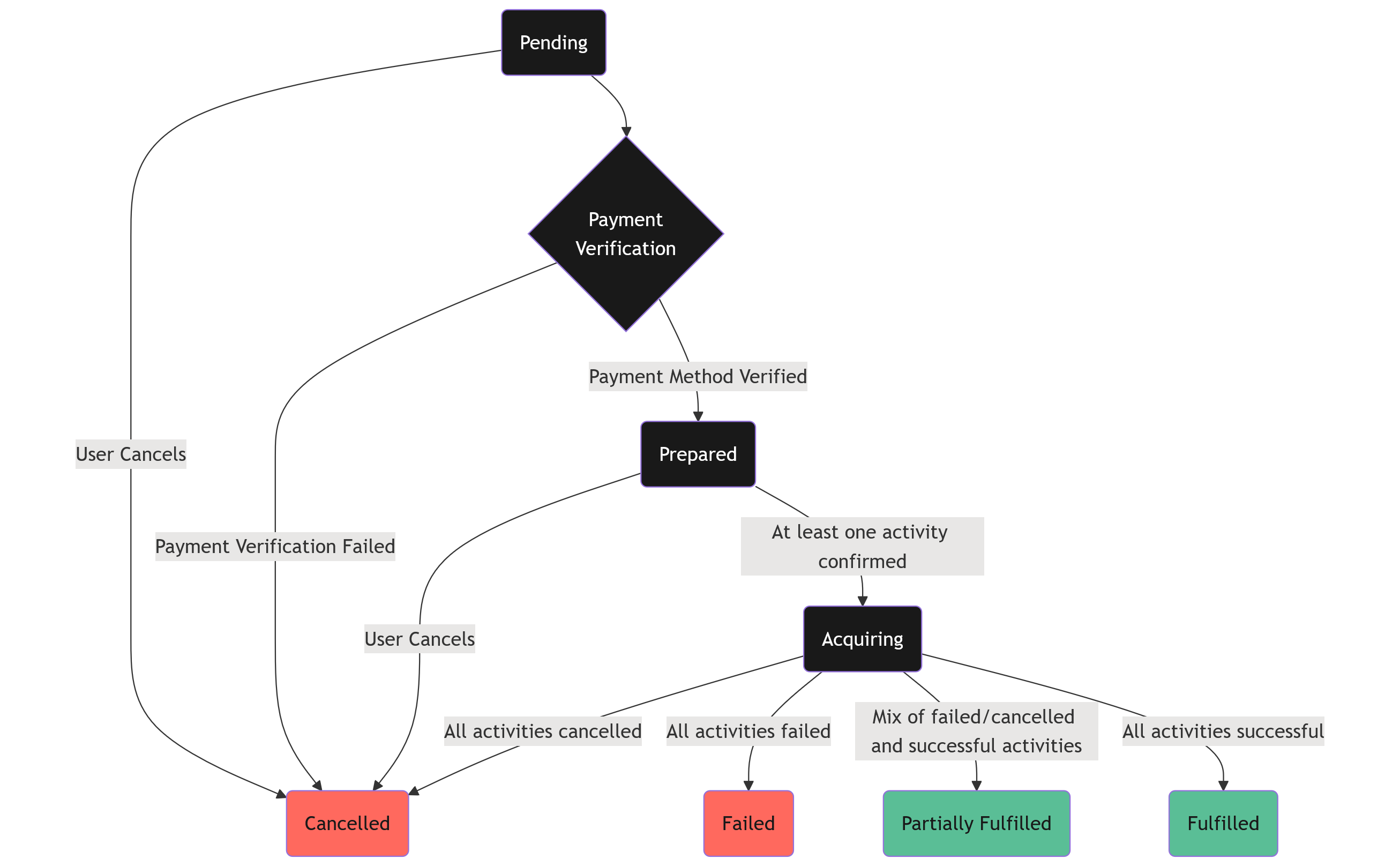
A scene tasking request will pass through a number of statuses through the lifecycle of the tasking request, as illustrated in the flow chart below, showing the transitions between statuses.
it will allow users to only need to select the desired time window, the satellites and instruments to task and any objectives/constraints to apply. Each coverage request will be subject to aproval by the Open Cosmos operations team. An optimisation algorithm is used to determine the individual satellite activities that will fulfil the request, which are verified by the Open Cosmos operations team before scheduling.
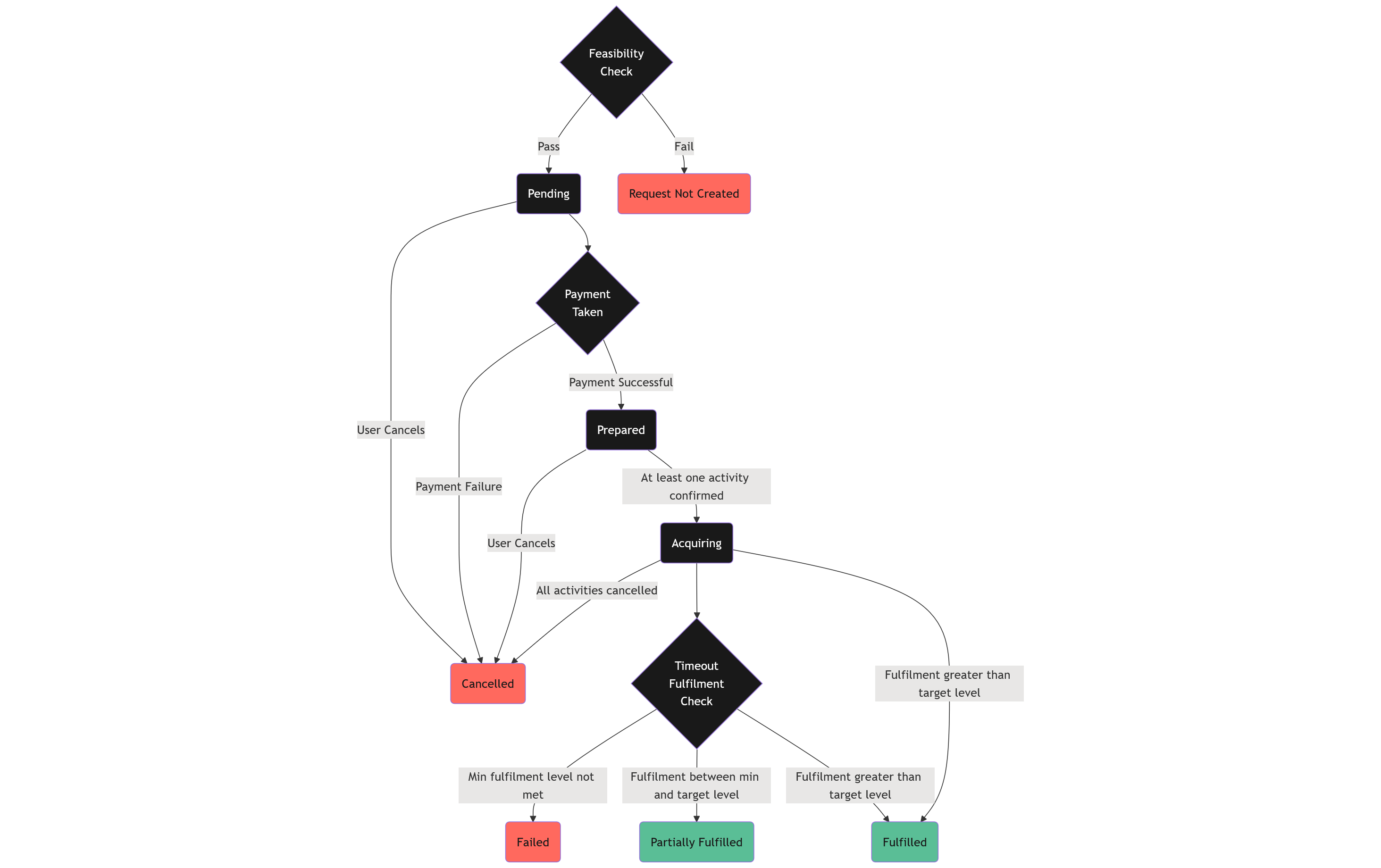
Similarly for coverage tasking requests, the lifecycle is illustrated in the flow chart below, showing the transitions between statuses.
Pre-creation Check
Coverage tasking requests undergo a "Feasibility Check" to determine whether they can be fulfilled based on the input data. This preliminary stage yields a boolean result: True if the request can be feasibly accomplished by the optimization process, and False otherwise. The feasibility of a request depends on various factors, including the number of satellites involved, the specific time window, and the size of the area of interest, among others.
Initial Stages
PENDING: A request that has been submitted but is not yet active. This typically happens when the request has passed the pre-creation feasibility checks, but the user has not completed the process to select a payment method.
Intermediary Stages
PREPARED: A request that has completed all the necessary payment and feasibility checks. It is now waiting for the Open Cosmos operations team to review and approve the request (scene tasking request), or is waiting for activities to be scheduled by the coverage tasking system (coverage tasking requests).
ACQUIRING: At least one activity associated with the tasking request has been approved by the Open Cosmos operations team and has been confirmed to be acquired.
PROCESSING All activities have been downloaded and at least one of them is still being processed.
Final Stages
FULFILLED: The request is completed successfully and the data is available on DataCosmos to access.
PARTIALLY FULFILLED: Some data is available to access on DataCosmos, but it might not meet all requirements or might not cover the entire area of interest.
FAILED: The request was not completed successfully and no images were delivered. For example, if all images acquired were completely covered in clouds and there was a cloud coverage constraint; or in a Manual Request with a single activity, if the satellite was not able to perform the acquisition.
CANCELLED: The request has been cancelled by the user or the Open Cosmos operations team.
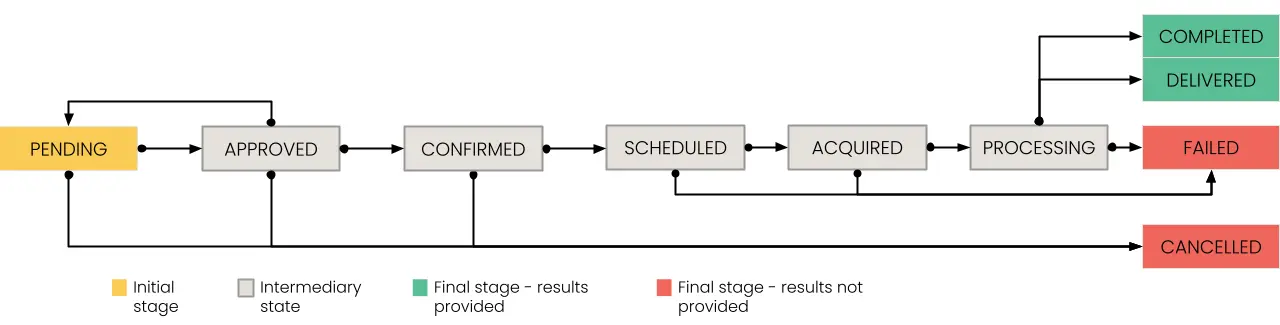
Tasking Activities Status Lifecycle
Initial Stages
PENDING: An activity that has been suggested by a human or AI system but it has not yet been confirmed into the schedule, so it can still be modified.
APPROVED: The activity has been reviewed by the Open Cosmos flight team and is safe to be executed. The activity can still be modified, but will revert to PENDING if changes are made
Intermediary Stages
CONFIRMED: An activity that has been confirmed in the schedule and can therefore no longer be modified nor deprioritised against other activities.
SCHEDULED: An activity that has already been scheduled on the spacecraft or that has already been executed but Open Cosmos is still assessing the final outcome.
ACQUIRED: The image has been acquired by the spacecraft and is on its way to processing.
PROCESSING: The image has been downloaded and is being processed on ground to the specified processing level.
Final Stages
COMPLETED or DELIVERED: The activity is shown as DELIVERED once the data is available at your requested processing level, which can happen before it is completed. An activity is COMPLETED when it reaches the highest processing level for that satellite. The DELIVERED status will be used when getting the activity in the context of a Tasking Request, whilst the COMPLETED status is used when working with the activity independently of a Tasking Request. Old activities or one that have suffered anomalies might be display COMPLETED even when queried from the context of Tasking Request, if that happens, please contact support for assistance quoting the activity ID and corresponding project.
FAILED: The activity was scheduled but did not execute correctly or the data generated is not useful.
CANCELLED: The activity has been cancelled by the customer or Open Cosmos.
Scheduling
Open Cosmos will prioritise Tasking Activities before they become "confirmed" based on the priority level. Lower numbers indicate higher priority.
- Priority Level 5 - Humanitarian emergency.
- Priority Level 10 to 30 - Reserved for Open Constellation customers.
- Priority Level 40 - Priority.
- Priority Level 50 - Standard.
- Priority Level 51 to 100 - Reserved for internal Open Cosmos use.
If two activities conflict, the lowest priority activity will become cancelled.
Where to next