DataCosmos Release Notes - February 20, 2026
Today's DataCosmos release focuses on a large redesign of Tasking Requests, the progressive roll out of Customer Credits, and updates for the API documentation in Help Centre.
New Features
Tasking Request Redesign
In a previous update, we mentioned that the Platform has changed how assets are named and searched for within the Catalog, focussing on the Data Product types: Multispectral / Hyperspectral / SWIR / etc. From this release, these changes will also affect how Tasking Requests are created. For new Tasking Requests, the User will notice a number of changes. Firstly, once the AoI has been drawn, and the type of Request defined, the User will be presented with the Data Products available to them. Each available Data Product will be accompanied by a description of that Data Product, as well as its base price It is important to note that only 1 Data Product can be selected per Tasking Request. The Processing Level dropdown will allow the User to select a Processing Level for the Data Product. The options available will be based on what is available for each Data Product. The User then can select the Constraints for the Tasking Request, followed by the Data Range and search for available Opportunities.
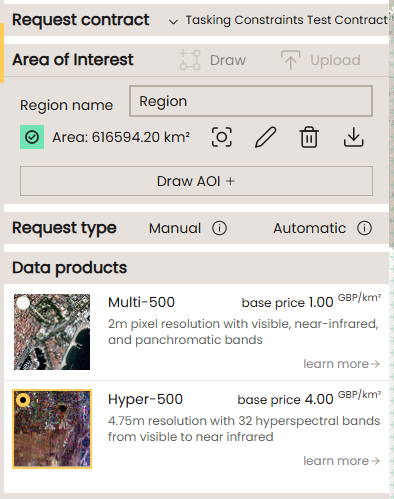
The layout of the Opportunities has also been modified.
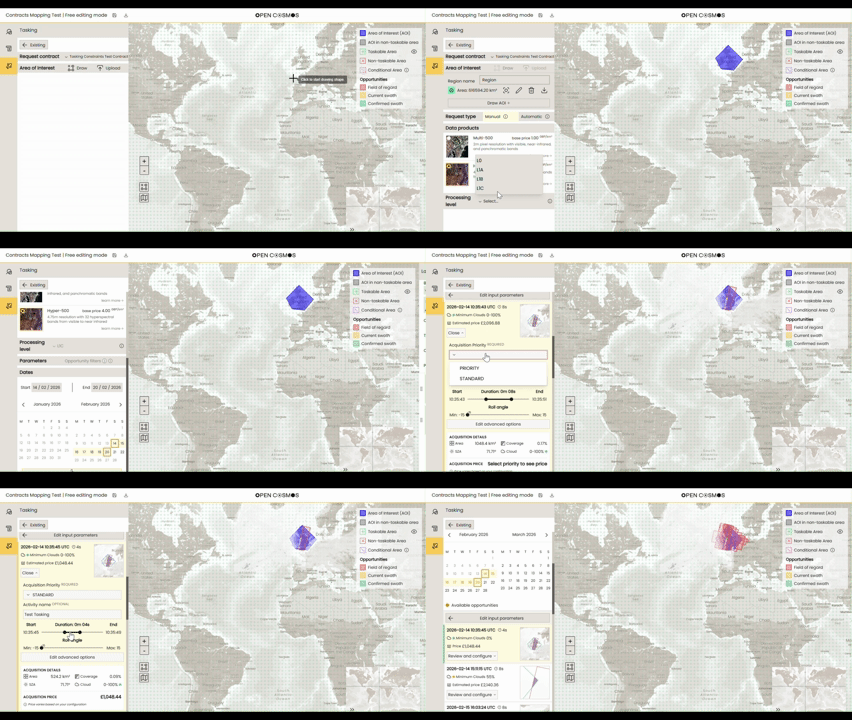
The Opportunity now shows the Date time and duration, the minimum cloud coverage prediction and the estimated Price, as well as a thumbnail showing the target AoI. The User must select the Acquisition Priority from the options available, and can enter an Activity Name if required. Users can choose to include an Activity Name, such as an internal reference ID, to aid tracking of Tasking Requests. The Start and End durations and roll angle can be set as before.
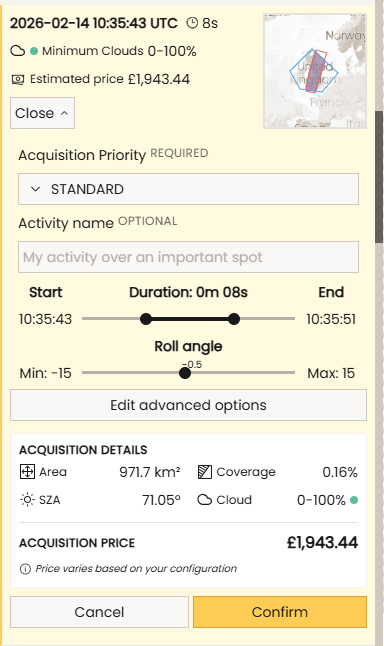
As the Start and End changes, the Acquisition Details and Price will reflect that change. Once the User is happy with the Request, simply push Confirm to add to the basket and complete the Order.
Credit Tracking
Please note: the Credits Tracker system will be progressively rolled out to existing customers.
The Credit Tracking system provides the following functionality to the Users of the Platform. 1 - View how many credits are available to spend 2 - View how many credits will expire in the following month. 3 - View how many credits will be added to the account in the following month 4 - View the list of orders showing how much credits each of them have used 5 - View which Users are purchasing with the credits (Organisation Admins only)
Credits will have an expiry date - usually monthly. After the expiry date passes, the correct amount of credits expire. Valid Credits can be used in the same way as purchasing using Currency in the Platform. 1 - If the user does not have enough credits to cover the Order, the order will be Rejected. 2 - During purchasing of Catalog items or Ordering Tasking Requests, Credits are always used from the pool of credits that will expire soonest.
API Updates - Help Centre
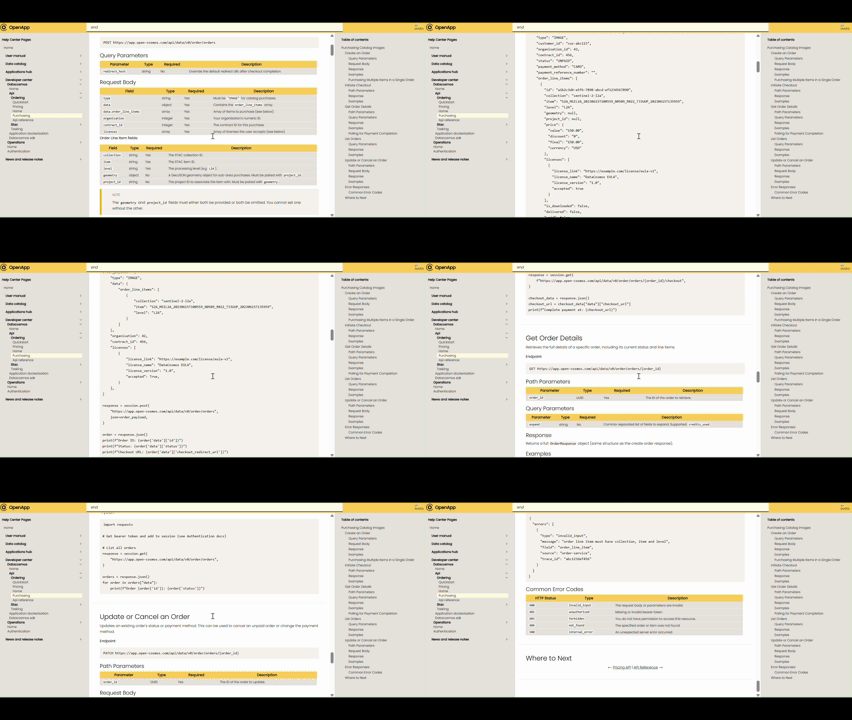
The following updates to the API Guides have been added to Help Centre:
1 - Documentation for obtaining the Pricing and making Purchases 2 - End-to-end example showing the required steps and API methods needed for Connecting, Searching, Purchasing and Downloading Images 3 - STAC Queries - consistent language for Implementation
Questions or Feedback?
If you have any questions about this release, please contact us at the DataCosmos Helpdesk.