Viewing data
Individual data products are displayed in the search results menu with a low-resolution image thumbnail and key product information, such as image processing level and price. Each product includes functional buttons that allow users to view, save, or purchase the data product components.
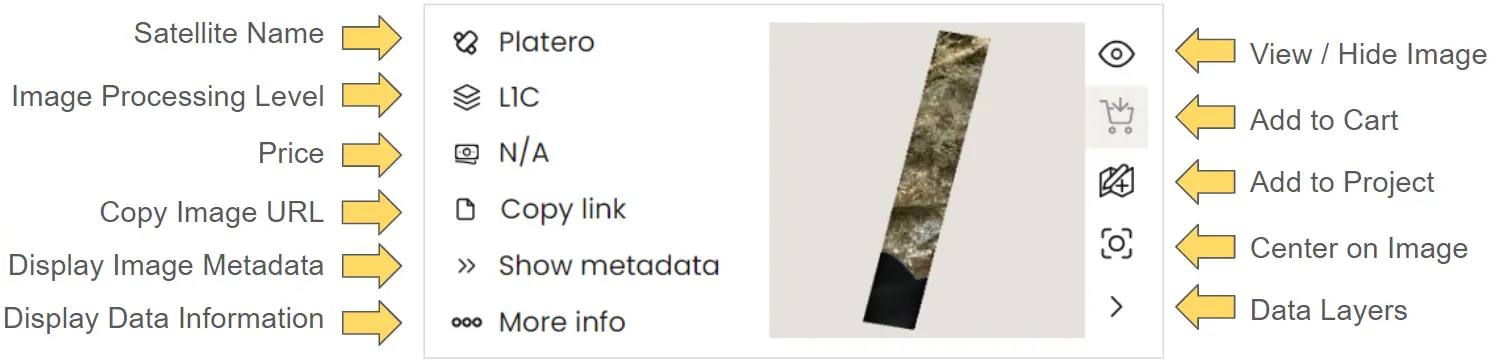
In this section, we will explain each of these functions and how to use them when interacting with your selected data.
View Data
Once a user has searched for and identified an appropriate image, they can display it in the main viewing window by selecting the View/Hide Image icon.
The first time the View Image button is used, it will navigate the main display to the geographic position of the image and show it.
If the user navigates away from the image, they can recenter the screen over the image by clicking the Center on Image icon.
This video demonstrates how to visualise an image and center the imager viewer over the observation location.
When selecting subsequent images with the View Image icon, it will not navigate to the image location
Map view tools
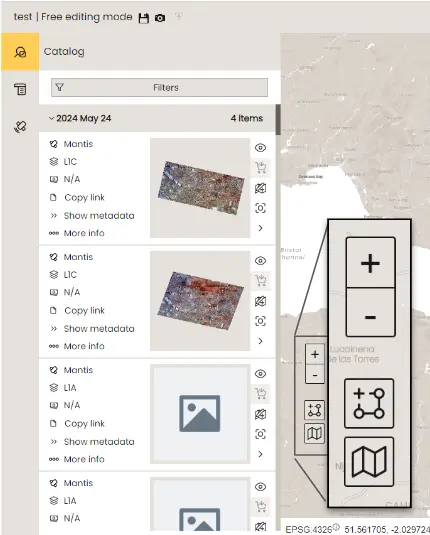
While viewing an image, users have a number of analysis tools avalible. Located in the bottom left of image viewer, these include a selection of basemaps, vector measuring tools, and simple zoom selector icons.
Basemaps
Basemaps are crucial for identifying geographical and administrative landmarks in and around the observed image. Within DataCosmos, users can choose from several options: a light (default) or dark basic landmass basemap, OpenStreetMap, and a hybrid Mapbox Satellite view that combines satellite imagery with points of interest overlays.
This video demonstrates the avaialble basemaps in the DataCosmos data viewer.
Vector measuring tools
In DataCosmos, users can use a number of vector tools to measure or highlight certain features in the image. This can be done with both lines and polygons, including single or multi vector polylines, or simple (rectangle, or circles) and complex polygon shapes. These features can be either manually drawn in the main viewer or uploaded as a .geojson, .gpkg, .shape, .kml, or .kmz file.
The vector measuring tools in DataCosmos.
Fun Fact
Did you know that the Grand Canyon, USA is 446 km long, up to 1.8 km deep, and up to 29 km wide. Search 36.324'N and -112.748'E in the filters menu to have a look.